



0 Рекомендую

Carpet set 75 - Wool Rug/ 4K
PRO
225 ₽
Royalty free
| Платформа: | 3dsMax 2016 + fbx |
| Рендер: |  Corona Corona |
| Размер: | 13 МБNEW |
| Цвета: | |
| Стиль: | Современный |
| Материалы: | Ткань |
| Форма: |
Опубликована 15 ноября 2022
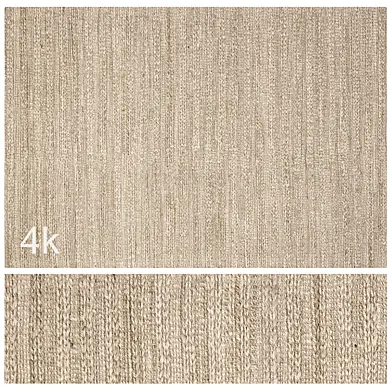
Carpet set 75 - Wool Rug/ 4K
set contains:
1. 3dmax CORONA
2. FBX
3. 4K Textures
Dimensions:
320x220x1.5cm
0.Check TurboSmooth for better results
1. Recommended to use "Corona Displacement Mod" Modifier for having best results.
You can control max/min levels under your wise criteria
Recommended levels (it could change depending on the rug)
- Min Level: 10-25mm
- Max Level: 15-50mm
On Subdivision Quality tab, check override.
Here you can control the quality of the displacement
Screen (px): 1-5px
For better image quality, decrease the (px) value.
For faster render times, increase (px) value.
2. You can control Ambient Oclussion on the Composite Material Map by opacity tab
- AO Opacity: 25-75% (it could change depending on the rug)
*If Ambient Oclussion is too high it will darken the texture. You can play with Multiply and Overlay Modes, both work well.
For Corona render, it is recommended to install a version of at least 1.5, since the glossiness of materials is configured taking into account PBR.
Dont hesitate to write me by DM if you have any problem, I will try to help you.
Enjoy!
set contains:
1. 3dmax CORONA
2. FBX
3. 4K Textures
Dimensions:
320x220x1.5cm
0.Check TurboSmooth for better results
1. Recommended to use "Corona Displacement Mod" Modifier for having best results.
You can control max/min levels under your wise criteria
Recommended levels (it could change depending on the rug)
- Min Level: 10-25mm
- Max Level: 15-50mm
On Subdivision Quality tab, check override.
Here you can control the quality of the displacement
Screen (px): 1-5px
For better image quality, decrease the (px) value.
For faster render times, increase (px) value.
2. You can control Ambient Oclussion on the Composite Material Map by opacity tab
- AO Opacity: 25-75% (it could change depending on the rug)
*If Ambient Oclussion is too high it will darken the texture. You can play with Multiply and Overlay Modes, both work well.
For Corona render, it is recommended to install a version of at least 1.5, since the glossiness of materials is configured taking into account PBR.
Dont hesitate to write me by DM if you have any problem, I will try to help you.
Enjoy!
0 комментариев

| Платформа: | 3dsMax 2016 + fbx |
| Рендер: | Corona |
| Размер: | 13 МБNEW |
| Цвета: | |
| Стиль: | Современный |
| Материалы: | Ткань |
| Форма: |
Опубликована 15 ноября 2022
Carpet set 75 - Wool Rug/ 4K
set contains:
1. 3dmax CORONA
2. FBX
3. 4K Textures
Dimensions:
320x220x1.5cm
0.Check TurboSmooth for better results
1. Recommended to use "Corona Displacement Mod" Modifier for having best results.
You can control max/min levels under your wise criteria
Recommended levels (it could change depending on the rug)
- Min Level: 10-25mm
- Max Level: 15-50mm
On Subdivision Quality tab, check override.
Here you can control the quality of the displacement
Screen (px): 1-5px
For better image quality, decrease the (px) value.
For faster render times, increase (px) value.
2. You can control Ambient Oclussion on the Composite Material Map by opacity tab
- AO Opacity: 25-75% (it could change depending on the rug)
*If Ambient Oclussion is too high it will darken the texture. You can play with Multiply and Overlay Modes, both work well.
For Corona render, it is recommended to install a version of at least 1.5, since the glossiness of materials is configured taking into account PBR.
Dont hesitate to write me by DM if you have any problem, I will try to help you.
Enjoy!
set contains:
1. 3dmax CORONA
2. FBX
3. 4K Textures
Dimensions:
320x220x1.5cm
0.Check TurboSmooth for better results
1. Recommended to use "Corona Displacement Mod" Modifier for having best results.
You can control max/min levels under your wise criteria
Recommended levels (it could change depending on the rug)
- Min Level: 10-25mm
- Max Level: 15-50mm
On Subdivision Quality tab, check override.
Here you can control the quality of the displacement
Screen (px): 1-5px
For better image quality, decrease the (px) value.
For faster render times, increase (px) value.
2. You can control Ambient Oclussion on the Composite Material Map by opacity tab
- AO Opacity: 25-75% (it could change depending on the rug)
*If Ambient Oclussion is too high it will darken the texture. You can play with Multiply and Overlay Modes, both work well.
For Corona render, it is recommended to install a version of at least 1.5, since the glossiness of materials is configured taking into account PBR.
Dont hesitate to write me by DM if you have any problem, I will try to help you.
Enjoy!
Похожие модели


Вы точно хотите безвозвратно удалить модель?