

Смотреть в галерее
1


Смотреть в галерее
1
0 Рекомендую


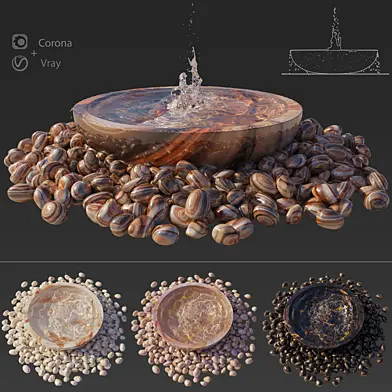
Large Water Fountains
PRO
225 ₽
Royalty free
| Платформа: | 3dsMax 2014 + obj |
| Рендер: |  Corona Corona |
| Размер: | 142 МБNEW |
| Цвета: | |
| Стиль: | Современный |
| Материалы: | Камень, Жидкость |
| Форма: |
Опубликована 3 июля 2019
Large Water Fountains Performed with high details and suitable for close up renders.
If you want Caustics:
- Corona Renderer 4
- Just enable Caustics Solver,
- Render setup> performance> enable Caustics Solver.
If you want extra control over the caustics, you can add a CShading_Caustics render element, and check the “Only in caustics element” option under the caustics settings. This will let you composite the Caustics layer in post, so that you can mask it, make it brighter or darker, and so on.
---------------------------------
In the archive: 3Dmax 2014 (Corona) + OBJ + MTL
& Textures.
---------------------------------
For all questions about the model, please contact us with a personal message.
If you want Caustics:
- Corona Renderer 4
- Just enable Caustics Solver,
- Render setup> performance> enable Caustics Solver.
If you want extra control over the caustics, you can add a CShading_Caustics render element, and check the “Only in caustics element” option under the caustics settings. This will let you composite the Caustics layer in post, so that you can mask it, make it brighter or darker, and so on.
---------------------------------
In the archive: 3Dmax 2014 (Corona) + OBJ + MTL
& Textures.
---------------------------------
For all questions about the model, please contact us with a personal message.
0 комментариев

| Платформа: | 3dsMax 2014 + obj |
| Рендер: | Corona |
| Размер: | 142 МБNEW |
| Цвета: | |
| Стиль: | Современный |
| Материалы: | Камень, Жидкость |
| Форма: |
Опубликована 3 июля 2019
Large Water Fountains Performed with high details and suitable for close up renders.
If you want Caustics:
- Corona Renderer 4
- Just enable Caustics Solver,
- Render setup> performance> enable Caustics Solver.
If you want extra control over the caustics, you can add a CShading_Caustics render element, and check the “Only in caustics element” option under the caustics settings. This will let you composite the Caustics layer in post, so that you can mask it, make it brighter or darker, and so on.
---------------------------------
In the archive: 3Dmax 2014 (Corona) + OBJ + MTL
& Textures.
---------------------------------
For all questions about the model, please contact us with a personal message.
If you want Caustics:
- Corona Renderer 4
- Just enable Caustics Solver,
- Render setup> performance> enable Caustics Solver.
If you want extra control over the caustics, you can add a CShading_Caustics render element, and check the “Only in caustics element” option under the caustics settings. This will let you composite the Caustics layer in post, so that you can mask it, make it brighter or darker, and so on.
---------------------------------
In the archive: 3Dmax 2014 (Corona) + OBJ + MTL
& Textures.
---------------------------------
For all questions about the model, please contact us with a personal message.
Похожие модели

PRO
6
66

PRO
6
21

PRO
6
4

PRO
7
19

PRO
2
2
PRO
44
Вы точно хотите безвозвратно удалить модель?